I think I finally have a decent, working camera solution! Hooray! Very happy. I'm going to play around with it a bit more to make it super-perfect, but the groundwork and transitions are there.
Click here to play in the browser.
Click here to download the executable.
Other new things:
A startup flow!
At the moment it just shows the title and transitions to the default game camera, but the flow is there which means I can add things like tutorial images.
Items!
I've modelled and textured the dynamite, key, candle and lantern.
Music!
Found a cute background track by Kevin MacLeod. I think it works quite well.
HUGE performance fixes!
This has been such a massive, boring timesink... But the game now runs A LOT smoother on low-end machines thanks to greatly reduced polycounts, better material setups, cheaper water, fewer lights and other things. I've also redone the pathfinding setup to be based on invisible meshes rather than materials.
Items can now be combined!
And by "items" I mean "the candle and lantern".
New background!
I tried to make my own skybox, but it ended up looking absolutely terrible, so I gave up and just used a single background plane instead. With the new camera system you don't see much of the sky anyway, so it's not a big deal.
New selection method!
You can now click each character directly to select them.
Next up:
I need to model a gate and some candle holders, and, you know, make the game playable. I want to get it to a state where it can be tested as soon as possible, as I really want to do at least one usability test with at least one person before the deadline. But now that the cameras don't block the gameplay I can steam ahead like a boss...
Monday, April 8, 2013

Monday, March 11, 2013
Introducing web builds - hooray!
I've figured out how to get web builds working using Dropbox! This makes it a lot easier to have a quick look at the state of the game. As long as the Unity web plugin (not the editor) is installed it should just run in the browser.
Having said this, the game is not made for browsers. It will run and look a lot worse in a browser than as a standalone application, especially if the computer isn't particularly brilliant. So while the web builds will be good for quick overviews, I'd really recommend downloading and extracting the archived builds for any "real" reviews.
I have a brand new build to show, too! In this I've added some placeholder objects to the scene. Simply click to pick them up and add them to the inventory. The items can be dragged around in the inventory, but combining two items doesn't work yet. The items can't be used in any way either, but it's getting there. This is just a little WIP build to show a bit of progress.
Click here for a web version of the build.
Click here to download the build as a zip file.
I - obviously - need to make it possible to combine items and to use items in the scene. I also need to figure out a camera solution; I'm leaning towards using one zoomed-in follow camera for each character and a zoomed-out scene view toggle. Since the current camera setup would make the game impossible to complete (the lights along the bottom of the scene can't be seen or used) I'll need to tackle that before I carry on with the items and inventory.
Having said this, the game is not made for browsers. It will run and look a lot worse in a browser than as a standalone application, especially if the computer isn't particularly brilliant. So while the web builds will be good for quick overviews, I'd really recommend downloading and extracting the archived builds for any "real" reviews.
I have a brand new build to show, too! In this I've added some placeholder objects to the scene. Simply click to pick them up and add them to the inventory. The items can be dragged around in the inventory, but combining two items doesn't work yet. The items can't be used in any way either, but it's getting there. This is just a little WIP build to show a bit of progress.
Click here for a web version of the build.
Click here to download the build as a zip file.
I - obviously - need to make it possible to combine items and to use items in the scene. I also need to figure out a camera solution; I'm leaning towards using one zoomed-in follow camera for each character and a zoomed-out scene view toggle. Since the current camera setup would make the game impossible to complete (the lights along the bottom of the scene can't be seen or used) I'll need to tackle that before I carry on with the items and inventory.
Monday, March 4, 2013
Character selection AND MORE!
Right, a super productive weekend has resulted in some new mechanics! Apologies for lots of downloadable files in this post, but I don't have a website where I can post web player builds. :(
First up is a build with a working version of the selection mechanic, as outlined in the previous post.
Download HERE.
There's a (very placeholder-y) HUD in this build that allows the player to switch between Otis and Fawn as well as move the selected character around the level.
It took me FOREVER to figure out how to make this work; the GetGUIElementHitTest action I tried to use initially didn't do anything at all. In theory, it should have been able to tell if a left button mouse click had hit a GUI texture and fire an event... But no. I ended up having to place invisible buttons on top of the character icons; this worked much better.
When the player clicks either icon a state machine sends a message to a character switcher script that says "oi, this character is active now!", which then sends the same message through to the movement script.
 This value is also read by ANOTHER state machine that handles the icon swap on the HUD. Phew.
 I LOVE how Unity handles global/public variables and how you can make state machines and scripts talk to each other. So easy and accessible. Debugging the values is easy as pie too, since they're exposed in both the inspector and the state machines and change during runtime. Very tasty.
 Known issues in this build:
The HUD textures are pixelated. I honestly have no idea why they're doing this - the alpha channel looks fine in Photoshop. I'll have to investigate. But this is a great time to introduce the QA tab in Hansoft! At this moment I only have one bug, but I expect this number to increase very very much as I go along.
 There's also the lack of particle effect/audio/other feedback when a character is selected, but the important thing is that the trigger to add those things exists. The rest is polish (important polish, but polish nonetheless).
BUT THAT'S NOT ALL!
In THIS build the level has been zoned off to include this functionality:
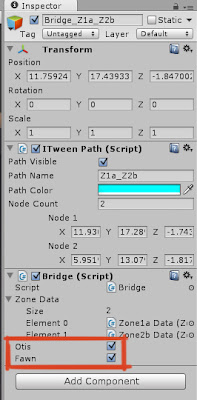
 So Fawn can't move to the top left cave, and Otis can't reach the bottom left cave. This is done by setting the bridges (splines) between the zones to be accessible by Fawn, Otis or both.


First up is a build with a working version of the selection mechanic, as outlined in the previous post.
Download HERE.
There's a (very placeholder-y) HUD in this build that allows the player to switch between Otis and Fawn as well as move the selected character around the level.
It took me FOREVER to figure out how to make this work; the GetGUIElementHitTest action I tried to use initially didn't do anything at all. In theory, it should have been able to tell if a left button mouse click had hit a GUI texture and fire an event... But no. I ended up having to place invisible buttons on top of the character icons; this worked much better.
When the player clicks either icon a state machine sends a message to a character switcher script that says "oi, this character is active now!", which then sends the same message through to the movement script.


The HUD textures are pixelated. I honestly have no idea why they're doing this - the alpha channel looks fine in Photoshop. I'll have to investigate. But this is a great time to introduce the QA tab in Hansoft! At this moment I only have one bug, but I expect this number to increase very very much as I go along.

BUT THAT'S NOT ALL!
In THIS build the level has been zoned off to include this functionality:


I realise that these floaty splines aren't the prettiest or most elegant solutions, but they'll have to do until I find the time to create some animations.
...BUT THAT'S NOT ALL EITHER!
With both characters moving around the level it was super easy to add a little distance check between them.

Download this build to see the light/dark change!

The ambient light colour is changed over a time of two seconds, as is the main light in the level and the colour of the fog.The skybox also changes, but in a very abrupt and horrible way since I don't think there is a way to make it fade to another. I'll have to get rid of the skyboxes and use planes instead, and hopefully there is some way to fade between textures to make it a little bit smoother.
Phew! Good progress, I'd say. Next I'll have to tackle the inventory and items in the level, as well as the cameras. It's becoming increasingly clear that the game will be quite unplayable with a static camera... The angle of the camera means that it's hard to click certain areas to move there, and that the candles on the wall along the bottom won't be visible and thus impossible to use. I'm thinking either a zoomed in camera that follows the selected character, or a solution that blends between different static cameras depending on where the selected character is. We'll see.
Friday, March 1, 2013
Movement, hills and character selection
Hi blog, long time no see! Terribly sorry, but at least I have some tasty updates to share today and hopefully over the course of the weekend.
So, as every reader of this blog knows it is now possible to walk around the level with one of the characters. That build can be found HERE. Hooray!
How this works:
Each chunk of ground is an area. Each area is divided up into a series of zones connected by bridges (splines). Bridges are either jumps, ladders or walkways - basically anything that isn't just normal ground. In this build, the zones have different textures. When the player clicks on a walk-able spot the game uses raytracing to determine which area and zone the location is in by reading the mesh and material of the clicked polygon. The game then calculates how the character can walk there and which splines (bridges) to use. Magic!
Now, this build has a number of issues; the ladders don't have any collision, the camera isn't great, it hurts to look at the thing... But the movement is solid, which is a HUGE deal. Hooray!
I've also created some placeholder background elements to make the game a little bit easier on the eye.

 Oh well. It's very likely that I'll have to work out some kind of solution for the camera later, anyway.
Next up is the character selection. I've added a second character to the Unity scene, and now I want to throw the HUD in there too and create a selection mechanic.
 Another option is to also allow the player to move both characters at the same time, but this adds a lot of complexity to the movement functionality. So for now, I'm sticking with one character being active at a time. Wish me luck!
So, as every reader of this blog knows it is now possible to walk around the level with one of the characters. That build can be found HERE. Hooray!
How this works:
Each chunk of ground is an area. Each area is divided up into a series of zones connected by bridges (splines). Bridges are either jumps, ladders or walkways - basically anything that isn't just normal ground. In this build, the zones have different textures. When the player clicks on a walk-able spot the game uses raytracing to determine which area and zone the location is in by reading the mesh and material of the clicked polygon. The game then calculates how the character can walk there and which splines (bridges) to use. Magic!
Now, this build has a number of issues; the ladders don't have any collision, the camera isn't great, it hurts to look at the thing... But the movement is solid, which is a HUGE deal. Hooray!
I've also created some placeholder background elements to make the game a little bit easier on the eye.

...naturally, most of them aren't even visible in the actual game.

Next up is the character selection. I've added a second character to the Unity scene, and now I want to throw the HUD in there too and create a selection mechanic.

Wednesday, February 13, 2013
Click to move...
...it sounds so simple, right?
Well, it isn't. First of all I've spent way too long just getting the ground mesh in and working - importing the curves from Illustrator looked awesomely easy but resulted in insanely messy meshes. Once I got the meshes looking kind of alright the scale from Maya to Unity was all messed up AND THEN I realised that the level design wasn't built for screen proportions in the first place so I had to go back to Illustrator to stretch out the level paths and start all over again.
Oh. Dear.
Anyway. I got there in the end.
 As for the actual click-to-move mechanic - which sounds so simple - I'm a little bit stuck but looking into a bunch of options. Who knew that making a massive level with a million tunnels could prove complex when there isn't any pathfinding or navmesh functionality in the free version of Unity? Pfft. One option is to use splines, one is to use free plugins for pathfinding, another is to try to hack together a mix of both combined with some scripting and/or state machines. I'll carry on tomorrow now that I have the actual ground mesh working and after I get some rest... Blargh!
Well, it isn't. First of all I've spent way too long just getting the ground mesh in and working - importing the curves from Illustrator looked awesomely easy but resulted in insanely messy meshes. Once I got the meshes looking kind of alright the scale from Maya to Unity was all messed up AND THEN I realised that the level design wasn't built for screen proportions in the first place so I had to go back to Illustrator to stretch out the level paths and start all over again.
Oh. Dear.
Anyway. I got there in the end.

Thursday, January 31, 2013
I made a game!
I spent yesterday following a fabulous Unity tutorial to get familiar with the editor. I even made a game! If you can call it that... Haha! It's quite terrible, but it has a menu, win/lose conditions (get a score of 10 to win), a countdown timer plus triggers for particle effects, colour changes and audio. It also taught me some super useful things about raycasting, moving objects around and how to use object tags, which I'll need to use to get my character movement working.
AND, look at all the code I wrote! Look! Look!


I'm trying to enjoy this smug feeling as much as possible, because I know it won't last. And how do I know that? Because I've spent this morning adding ALL the work for this project to Hansoft:

Provided I do absolutely everything bang on time, this schedule gives me a finishing date of around the 20th of May. Oh dear. However, this list includes art. Lots of it. Even animation. Lots of pretties will have to be sacrificed - but I knew that from the start. I never expected to actually make a fully functioning point and click game with final assets. But now that it's all in Hansoft I'll be able to shuffle things around and cut things as I go along, while keeping a good overview of the project.
Here's this week's sprint:
 Wish me luck...
AND, look at all the code I wrote! Look! Look!

I'm trying to enjoy this smug feeling as much as possible, because I know it won't last. And how do I know that? Because I've spent this morning adding ALL the work for this project to Hansoft:

Provided I do absolutely everything bang on time, this schedule gives me a finishing date of around the 20th of May. Oh dear. However, this list includes art. Lots of it. Even animation. Lots of pretties will have to be sacrificed - but I knew that from the start. I never expected to actually make a fully functioning point and click game with final assets. But now that it's all in Hansoft I'll be able to shuffle things around and cut things as I go along, while keeping a good overview of the project.
Here's this week's sprint:

Wednesday, January 30, 2013
UI elements and movement mechanics

I've also gotten Unity up and running, which is super exciting! The first - and probably most difficult thing - I want to implement is the character movement. I REALLY want to use a click-to-move mechanic as opposed to WASD-style direct control, but this requires some element of pathfinding since the free version of Unity doesn't support navmeshes. Cue headache...
I was trying to figure this out as I was falling asleep last night and I realised I might be able to just stick the characters on splines. It SHOULD work for this simple level - the tricky part being when and how to switch between different splines depending on where the player clicks. I should be able to hack that together with trigger boxes though... We'll see. There is a glimmer of hope though! Anyway, this is what I'll start with:

Subscribe to:
Posts (Atom)