I am very happy to announce that, apart from one teeny tiny pesky bug, my prototype is done! I've spent the weekend adding sound effects, tweaking the particle effects, tightening up the collision and generally fixing little bits and bobs. Oh, and the characters have faces now!
Here's the (almost) finished build!
Click here for a browser version. The UI looks weird in all browser builds; I genuinely dislike (or just don't understand) how Unity handles GUI textures for different resolutions. The web version of the game might also look quite horrendous, so I don't really recommend running it in a browser at all.
Speaking of GUI textures... The one remaining issue has to do with the backgrounds for the hints; they're all fine when the game runs in 1600x900, but when the resolution is decreased they shrink and no longer match the text. I'll have to have a look at it tomorrow.
So apart from that pesky lil' bug I am pretty happy to call myself finished with this demo. It plays well, it looks all right and it's pretty close to the original level design. It would have been epic to get the hug mechanic in, to have custom audio and lots of animations... But I'm only human, and as a design portfolio piece I think it's pretty sweet.
I'll post the super-final build once it's done, and I'm also working on a post that goes through all the things that have inspired me and influenced this project. Aaand then there's the expanded prototype dev diary that I want to write. And then I need to tidy up all the folders I'm submitting. And then, I think, I'm done.
Sunday, May 19, 2013

Friday, May 17, 2013
Playtest results
I sent the previous build out for testing and so far I've received some SUPER useful feedback. I was looking for some all-round thoughts about the game and UI, to find out if people understood what was going on. I've sent the game to six people and so far I've had feedback from three.
These are the questions I asked:
Did the tutorial make sense?
Did you understand the light/dark change?
Did you complete the level?
Was anything in the game confusing?
The game is supposed to be pitch black in certain areas, but did you ever think it was it too dark across the entire level?
Did the game run smoothly, or was it jerky and stuttery?
Do you have any other comments?
Here's a fancy Excel sheet with the comments.
The most confusing thing seems to be the inventory, and knowing which character is using which item. For instance, people are trying to open the gate with Otis while Fawn is carrying the key... Which won't work. I've tried to clarify this by adding a coloured highlight around the active object - orange if Fawn is carrying the item, and blue if Otis is.
Other improvements include:
Here's a build!
Some screenshots:


My remaining to-do list, from Hansoft:
 It's getting there...! Well, I guess deleting the entire animation sprint helped. The walk-bouncies will have to do for this prototype! There's no way I can model, rig and animate the characters for Friday. I'd rather spend that time polishing the rest of the game than creating shoddy newbie-animations. But for the submission I'll include a little write-up of all the things I would have added to the game if I had also been a gifted audio designer and artist who could rig, skin and animate.
I've kept Hansoft updated throughout the project and it has really helped keep me from freaking out about the workload. It's been more of a fancy to-do list and overview than anything else... But that's all I've needed, since the game (and team, haha) is so small.
I want to sent another build out to people next week, to see if they think the game has improved. I'm very reluctant to make any major changes after this weekend so it won't be a huge test, but still useful.
Right - now to find some more sound effects...
These are the questions I asked:
Did the tutorial make sense?
Did you understand the light/dark change?
Did you complete the level?
Was anything in the game confusing?
The game is supposed to be pitch black in certain areas, but did you ever think it was it too dark across the entire level?
Did the game run smoothly, or was it jerky and stuttery?
Do you have any other comments?
Here's a fancy Excel sheet with the comments.
The most confusing thing seems to be the inventory, and knowing which character is using which item. For instance, people are trying to open the gate with Otis while Fawn is carrying the key... Which won't work. I've tried to clarify this by adding a coloured highlight around the active object - orange if Fawn is carrying the item, and blue if Otis is.
Other improvements include:
- All icons have shiny new alpha channels and should appear less jaggedy.
- Particle effects and audio on character selection.
- The dark/light fade time is a bit longer to make it less abrupt.
- Items in the inventory can be right-clicked for a description.
- The candle icon has been updated; the old one looked too much like dynamite.
- I've fixed a bug with the top most ladder, where the characters would fall through the floor and snap back... D'oh!
- The hint visuals have been improved a bit, with a nicer font and better background.
- I've added the new gate, which has a big, shiny padlock. Before this it was a bit confusing to know where to actually use the key.
- More sound effects.
- ...and of course, it's much prettier! I've added a gazillion rocks, some wooden beams/supports, more mushrooms and tweaked the lights.
Here's a build!
Some screenshots:


My remaining to-do list, from Hansoft:

I've kept Hansoft updated throughout the project and it has really helped keep me from freaking out about the workload. It's been more of a fancy to-do list and overview than anything else... But that's all I've needed, since the game (and team, haha) is so small.
I want to sent another build out to people next week, to see if they think the game has improved. I'm very reluctant to make any major changes after this weekend so it won't be a huge test, but still useful.
Right - now to find some more sound effects...
Monday, May 13, 2013
P-p-p-p-p-layable!
Hiii there lil' blog! I know I haven't updated for ages and ages - more than a month! - but that doesn't mean I've been slacking off... No no no! In fact, I have a SUPER DUPER EXCITING announcement to make...
THE PROTOTYPE IS FULLY PLAYABLE!!!!!11one
:D :D :D
CLICK CLICK CLICK! This is the .exe...
...and this is the browser version.
One big change I've had to make is to ditch the hug mechanic for this demo. The original plan was to have the gate key inside a closed flower, which was opened temporarily if the characters hugged near it. To open it fully the player had to blow a hole in the cave roof to let the sun in. I know, I know, it would have been so nice... :( But having Otis and Fawn find their way to each other, play some kind of hug animation, hook up environment triggers, model and animate opening flowers, create a huge roof explosion... There's no way I'd be able to implement all that to a high enough standard. I don't even know how to animate... Ahem. So the scope-hammer had to come down, and instead the route to the key is blocked by some boulders that the player has to blow up. It's the same level flow, just one less mechanic.
Other new things:
A tutorial!
Getting all the puzzles and items working was obviously a priority but close after that was the tutorial. I want to get this out to people to playtest this week, which would be pointless without any kind of tutorial. It's really hard to write instructions when you know your game inside and out, though... So hopefully I'll get some good feedback. There's also a little help button which brings up the tutorial screen again.
An end!
The game restarts when you finish the level.
Hints!
Right click on areas of interest to bring up a little description or hint. I've only added a few of these so far, and they need to be prettied up, but the functionality is quite nice.
Walk wobbles!
The characters bounce when they walk! Daawwh. There's also some basic stepping sounds, and a joyous bonus bounce at the end of the game...
Lights!
I've done a first pass of the lighting and light functionality for the dark level. There's a light switch and a camera transition which reveals the lantern, and the dynamite is now hidden until the lantern is lit. Oh my gosh, I haven't shown the lantern, have I?! Oh dear!
Lantern!
The characters now carry the lantern, and it has a light and everything and it's really quite lovely :D
I think that's it... So a lot of things are kind of in-progress still, but the game is actually playable. How awesome is that?!
Still to do:
Usability test
I'm going to send out a build with some questions to a handful of lucky volunteers and see what they say. Obviously we're quite close to the end of the term so if they come back with feedback along the lines of "the light/dark mechanic is terrible" I might not be able to act on it. However, I'd still like to do a quick write-up of what I WOULD do if I had the time.
The gate
This is still a rather ugly placeholder model. It could do with being a bit less, well, ugly.
Hints
More hints need to be added, and they need background textures. Speechbubbles maybe?
The light level
The dark version of the level looks more cosy and interesting than the light one... So I need to fix that. The free version of Unity is TERRIBLE when it comes to pretty things like lightshafts and glow effects, but I'll try to figure something out.
The dark is too dark
The dark level looks lovely on my machine, but on other monitors it's pitch black and completely unplayable. I'm not quite sure how to fix it at the moment. I might look into adding some kind of brightness slider, or I could chop up the ground meshes into different bits and light them differently... We'll see. This is a scary one.
Messages and feedback
It would be nice to have little pop-ups when you're trying to do something that isn't possible. So if you're trying to light the candle without the lantern it'd tell you to find something to put the candle in.
Audio
I need to scavenge the internets for sound effects! I might even record my own little voices for the characters... Haha. I REALLY want some silly Botanicula-style character sounds.
Pretties!
Rocks, mushrooms, flowers, eyes in the darkness, wooden beams... I want it all! My plan is to spend this week polishing the daylights out of the game... Depending on the usability feedback, of course.
THE PROTOTYPE IS FULLY PLAYABLE!!!!!11one
:D :D :D
CLICK CLICK CLICK! This is the .exe...
...and this is the browser version.
One big change I've had to make is to ditch the hug mechanic for this demo. The original plan was to have the gate key inside a closed flower, which was opened temporarily if the characters hugged near it. To open it fully the player had to blow a hole in the cave roof to let the sun in. I know, I know, it would have been so nice... :( But having Otis and Fawn find their way to each other, play some kind of hug animation, hook up environment triggers, model and animate opening flowers, create a huge roof explosion... There's no way I'd be able to implement all that to a high enough standard. I don't even know how to animate... Ahem. So the scope-hammer had to come down, and instead the route to the key is blocked by some boulders that the player has to blow up. It's the same level flow, just one less mechanic.
Other new things:
A tutorial!
Getting all the puzzles and items working was obviously a priority but close after that was the tutorial. I want to get this out to people to playtest this week, which would be pointless without any kind of tutorial. It's really hard to write instructions when you know your game inside and out, though... So hopefully I'll get some good feedback. There's also a little help button which brings up the tutorial screen again.
An end!
The game restarts when you finish the level.
Hints!
Right click on areas of interest to bring up a little description or hint. I've only added a few of these so far, and they need to be prettied up, but the functionality is quite nice.
Walk wobbles!
The characters bounce when they walk! Daawwh. There's also some basic stepping sounds, and a joyous bonus bounce at the end of the game...
Lights!
I've done a first pass of the lighting and light functionality for the dark level. There's a light switch and a camera transition which reveals the lantern, and the dynamite is now hidden until the lantern is lit. Oh my gosh, I haven't shown the lantern, have I?! Oh dear!
Lantern!
The characters now carry the lantern, and it has a light and everything and it's really quite lovely :D
I think that's it... So a lot of things are kind of in-progress still, but the game is actually playable. How awesome is that?!
Still to do:
Usability test
I'm going to send out a build with some questions to a handful of lucky volunteers and see what they say. Obviously we're quite close to the end of the term so if they come back with feedback along the lines of "the light/dark mechanic is terrible" I might not be able to act on it. However, I'd still like to do a quick write-up of what I WOULD do if I had the time.
The gate
This is still a rather ugly placeholder model. It could do with being a bit less, well, ugly.
Hints
More hints need to be added, and they need background textures. Speechbubbles maybe?
The light level
The dark version of the level looks more cosy and interesting than the light one... So I need to fix that. The free version of Unity is TERRIBLE when it comes to pretty things like lightshafts and glow effects, but I'll try to figure something out.
The dark is too dark
The dark level looks lovely on my machine, but on other monitors it's pitch black and completely unplayable. I'm not quite sure how to fix it at the moment. I might look into adding some kind of brightness slider, or I could chop up the ground meshes into different bits and light them differently... We'll see. This is a scary one.
Messages and feedback
It would be nice to have little pop-ups when you're trying to do something that isn't possible. So if you're trying to light the candle without the lantern it'd tell you to find something to put the candle in.
Audio
I need to scavenge the internets for sound effects! I might even record my own little voices for the characters... Haha. I REALLY want some silly Botanicula-style character sounds.
Pretties!
Rocks, mushrooms, flowers, eyes in the darkness, wooden beams... I want it all! My plan is to spend this week polishing the daylights out of the game... Depending on the usability feedback, of course.
Monday, April 8, 2013
Cameras
I think I finally have a decent, working camera solution! Hooray! Very happy. I'm going to play around with it a bit more to make it super-perfect, but the groundwork and transitions are there.
Click here to play in the browser.
Click here to download the executable.
Other new things:
A startup flow!
At the moment it just shows the title and transitions to the default game camera, but the flow is there which means I can add things like tutorial images.
Items!
I've modelled and textured the dynamite, key, candle and lantern.
Music!
Found a cute background track by Kevin MacLeod. I think it works quite well.
HUGE performance fixes!
This has been such a massive, boring timesink... But the game now runs A LOT smoother on low-end machines thanks to greatly reduced polycounts, better material setups, cheaper water, fewer lights and other things. I've also redone the pathfinding setup to be based on invisible meshes rather than materials.
Items can now be combined!
And by "items" I mean "the candle and lantern".
New background!
I tried to make my own skybox, but it ended up looking absolutely terrible, so I gave up and just used a single background plane instead. With the new camera system you don't see much of the sky anyway, so it's not a big deal.
New selection method!
You can now click each character directly to select them.
Next up:
I need to model a gate and some candle holders, and, you know, make the game playable. I want to get it to a state where it can be tested as soon as possible, as I really want to do at least one usability test with at least one person before the deadline. But now that the cameras don't block the gameplay I can steam ahead like a boss...
Click here to play in the browser.
Click here to download the executable.
Other new things:
A startup flow!
At the moment it just shows the title and transitions to the default game camera, but the flow is there which means I can add things like tutorial images.
Items!
I've modelled and textured the dynamite, key, candle and lantern.
Music!
Found a cute background track by Kevin MacLeod. I think it works quite well.
HUGE performance fixes!
This has been such a massive, boring timesink... But the game now runs A LOT smoother on low-end machines thanks to greatly reduced polycounts, better material setups, cheaper water, fewer lights and other things. I've also redone the pathfinding setup to be based on invisible meshes rather than materials.
Items can now be combined!
And by "items" I mean "the candle and lantern".
New background!
I tried to make my own skybox, but it ended up looking absolutely terrible, so I gave up and just used a single background plane instead. With the new camera system you don't see much of the sky anyway, so it's not a big deal.
New selection method!
You can now click each character directly to select them.
Next up:
I need to model a gate and some candle holders, and, you know, make the game playable. I want to get it to a state where it can be tested as soon as possible, as I really want to do at least one usability test with at least one person before the deadline. But now that the cameras don't block the gameplay I can steam ahead like a boss...
Monday, March 11, 2013
Introducing web builds - hooray!
I've figured out how to get web builds working using Dropbox! This makes it a lot easier to have a quick look at the state of the game. As long as the Unity web plugin (not the editor) is installed it should just run in the browser.
Having said this, the game is not made for browsers. It will run and look a lot worse in a browser than as a standalone application, especially if the computer isn't particularly brilliant. So while the web builds will be good for quick overviews, I'd really recommend downloading and extracting the archived builds for any "real" reviews.
I have a brand new build to show, too! In this I've added some placeholder objects to the scene. Simply click to pick them up and add them to the inventory. The items can be dragged around in the inventory, but combining two items doesn't work yet. The items can't be used in any way either, but it's getting there. This is just a little WIP build to show a bit of progress.
Click here for a web version of the build.
Click here to download the build as a zip file.
I - obviously - need to make it possible to combine items and to use items in the scene. I also need to figure out a camera solution; I'm leaning towards using one zoomed-in follow camera for each character and a zoomed-out scene view toggle. Since the current camera setup would make the game impossible to complete (the lights along the bottom of the scene can't be seen or used) I'll need to tackle that before I carry on with the items and inventory.
Having said this, the game is not made for browsers. It will run and look a lot worse in a browser than as a standalone application, especially if the computer isn't particularly brilliant. So while the web builds will be good for quick overviews, I'd really recommend downloading and extracting the archived builds for any "real" reviews.
I have a brand new build to show, too! In this I've added some placeholder objects to the scene. Simply click to pick them up and add them to the inventory. The items can be dragged around in the inventory, but combining two items doesn't work yet. The items can't be used in any way either, but it's getting there. This is just a little WIP build to show a bit of progress.
Click here for a web version of the build.
Click here to download the build as a zip file.
I - obviously - need to make it possible to combine items and to use items in the scene. I also need to figure out a camera solution; I'm leaning towards using one zoomed-in follow camera for each character and a zoomed-out scene view toggle. Since the current camera setup would make the game impossible to complete (the lights along the bottom of the scene can't be seen or used) I'll need to tackle that before I carry on with the items and inventory.
Monday, March 4, 2013
Character selection AND MORE!
Right, a super productive weekend has resulted in some new mechanics! Apologies for lots of downloadable files in this post, but I don't have a website where I can post web player builds. :(
First up is a build with a working version of the selection mechanic, as outlined in the previous post.
Download HERE.
There's a (very placeholder-y) HUD in this build that allows the player to switch between Otis and Fawn as well as move the selected character around the level.
It took me FOREVER to figure out how to make this work; the GetGUIElementHitTest action I tried to use initially didn't do anything at all. In theory, it should have been able to tell if a left button mouse click had hit a GUI texture and fire an event... But no. I ended up having to place invisible buttons on top of the character icons; this worked much better.
When the player clicks either icon a state machine sends a message to a character switcher script that says "oi, this character is active now!", which then sends the same message through to the movement script.
 This value is also read by ANOTHER state machine that handles the icon swap on the HUD. Phew.
 I LOVE how Unity handles global/public variables and how you can make state machines and scripts talk to each other. So easy and accessible. Debugging the values is easy as pie too, since they're exposed in both the inspector and the state machines and change during runtime. Very tasty.
 Known issues in this build:
The HUD textures are pixelated. I honestly have no idea why they're doing this - the alpha channel looks fine in Photoshop. I'll have to investigate. But this is a great time to introduce the QA tab in Hansoft! At this moment I only have one bug, but I expect this number to increase very very much as I go along.
 There's also the lack of particle effect/audio/other feedback when a character is selected, but the important thing is that the trigger to add those things exists. The rest is polish (important polish, but polish nonetheless).
BUT THAT'S NOT ALL!
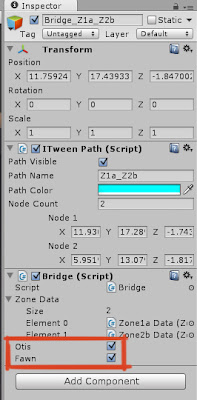
In THIS build the level has been zoned off to include this functionality:
 So Fawn can't move to the top left cave, and Otis can't reach the bottom left cave. This is done by setting the bridges (splines) between the zones to be accessible by Fawn, Otis or both.


First up is a build with a working version of the selection mechanic, as outlined in the previous post.
Download HERE.
There's a (very placeholder-y) HUD in this build that allows the player to switch between Otis and Fawn as well as move the selected character around the level.
It took me FOREVER to figure out how to make this work; the GetGUIElementHitTest action I tried to use initially didn't do anything at all. In theory, it should have been able to tell if a left button mouse click had hit a GUI texture and fire an event... But no. I ended up having to place invisible buttons on top of the character icons; this worked much better.
When the player clicks either icon a state machine sends a message to a character switcher script that says "oi, this character is active now!", which then sends the same message through to the movement script.


The HUD textures are pixelated. I honestly have no idea why they're doing this - the alpha channel looks fine in Photoshop. I'll have to investigate. But this is a great time to introduce the QA tab in Hansoft! At this moment I only have one bug, but I expect this number to increase very very much as I go along.

BUT THAT'S NOT ALL!
In THIS build the level has been zoned off to include this functionality:


I realise that these floaty splines aren't the prettiest or most elegant solutions, but they'll have to do until I find the time to create some animations.
...BUT THAT'S NOT ALL EITHER!
With both characters moving around the level it was super easy to add a little distance check between them.

Download this build to see the light/dark change!

The ambient light colour is changed over a time of two seconds, as is the main light in the level and the colour of the fog.The skybox also changes, but in a very abrupt and horrible way since I don't think there is a way to make it fade to another. I'll have to get rid of the skyboxes and use planes instead, and hopefully there is some way to fade between textures to make it a little bit smoother.
Phew! Good progress, I'd say. Next I'll have to tackle the inventory and items in the level, as well as the cameras. It's becoming increasingly clear that the game will be quite unplayable with a static camera... The angle of the camera means that it's hard to click certain areas to move there, and that the candles on the wall along the bottom won't be visible and thus impossible to use. I'm thinking either a zoomed in camera that follows the selected character, or a solution that blends between different static cameras depending on where the selected character is. We'll see.
Friday, March 1, 2013
Movement, hills and character selection
Hi blog, long time no see! Terribly sorry, but at least I have some tasty updates to share today and hopefully over the course of the weekend.
So, as every reader of this blog knows it is now possible to walk around the level with one of the characters. That build can be found HERE. Hooray!
How this works:
Each chunk of ground is an area. Each area is divided up into a series of zones connected by bridges (splines). Bridges are either jumps, ladders or walkways - basically anything that isn't just normal ground. In this build, the zones have different textures. When the player clicks on a walk-able spot the game uses raytracing to determine which area and zone the location is in by reading the mesh and material of the clicked polygon. The game then calculates how the character can walk there and which splines (bridges) to use. Magic!
Now, this build has a number of issues; the ladders don't have any collision, the camera isn't great, it hurts to look at the thing... But the movement is solid, which is a HUGE deal. Hooray!
I've also created some placeholder background elements to make the game a little bit easier on the eye.

 Oh well. It's very likely that I'll have to work out some kind of solution for the camera later, anyway.
Next up is the character selection. I've added a second character to the Unity scene, and now I want to throw the HUD in there too and create a selection mechanic.
 Another option is to also allow the player to move both characters at the same time, but this adds a lot of complexity to the movement functionality. So for now, I'm sticking with one character being active at a time. Wish me luck!
So, as every reader of this blog knows it is now possible to walk around the level with one of the characters. That build can be found HERE. Hooray!
How this works:
Each chunk of ground is an area. Each area is divided up into a series of zones connected by bridges (splines). Bridges are either jumps, ladders or walkways - basically anything that isn't just normal ground. In this build, the zones have different textures. When the player clicks on a walk-able spot the game uses raytracing to determine which area and zone the location is in by reading the mesh and material of the clicked polygon. The game then calculates how the character can walk there and which splines (bridges) to use. Magic!
Now, this build has a number of issues; the ladders don't have any collision, the camera isn't great, it hurts to look at the thing... But the movement is solid, which is a HUGE deal. Hooray!
I've also created some placeholder background elements to make the game a little bit easier on the eye.

...naturally, most of them aren't even visible in the actual game.

Next up is the character selection. I've added a second character to the Unity scene, and now I want to throw the HUD in there too and create a selection mechanic.

Subscribe to:
Posts (Atom)